This product has been discontinued.
For enquiries and sales please contact:
JaRoTECH B.V.
Dijkgraaf 8A
6721 NK Bennekom
The Netherlands
Tel: +31 (0)318 302729
Fax: +31 (0)84 8327087
E-Mail: [email protected]
Web: www.jarotech.nl
Sales Contact: Jan Rodenburg
At a Glance
- It is a non-contact instrument and needs only to be held close to the strand or wire to make the measurement.
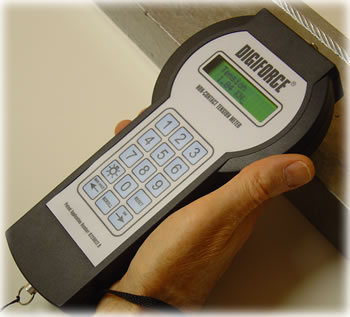
- The Digiforce is a hand-held, battery powered non-contact tension sensor which displays the tension in a concrete pre-stressing strand or wire.
- The Digiforce non-contact tension sensor has been developed specifically for pretensioned
precast concrete fabricators and is unique in its simplicity and
ease of use. - The integrated datalogging facility enables the collected test results to be downloaded to a host PC when convenient.
Description
Digiforce Non-Contact Tension Sensor Operating Principle (Patent No: 0229027.8)
The Digiforce non-contact tension meter comprises of a hand held battery powered instrument with a matrix keypad, alphanumeric display and magnetic flux density sensor. It is operated by holding it close to but not touching the vibrating member to be measured.
It operates on the principle that when a tensioned member anchored between two points is struck it vibrates at a frequency related to its tensile stress.
If the frequency of the vibrating member can be measured then the tensile stress can be calculated using the formula T=4 x L² x F² x W where:-
T is the tensile stress in decanewtons
L is the length of the tensioned member between the two anchor points
F is the frequency of oscillation of the tensioned member in Hz
W is the weight per metre of the tensioned member in kg/metre
Mounted within the case of the Digiforce is a magnetic pick up sensor that produces an output voltage in response to variations in its self-induced magnetic field caused by proximity to a moving ferrous metal part, (For non-ferrous material a ferrous clip is attached to the tensioned member).
The voltage pulses from the pick up sensor are then processed in a manner that determines the validity of each vibration by forming a tolerance range for each reading, comparing all the other readings to it and producing a score for each reading representing the number of readings within the tolerance range for that reading, determining the number of readings that have the highest score, taking an average of these readings and computing the frequency from the average.
Having determined in this manner the frequency of vibration of the member this data is then processed with the previously stored information for the length of the tensioned member between two fixed points and the weight of the member in gms/metre. The resultant force in kN is then displayed.
If the instrument is not satisfied with the quality of the vibration information it has received it will not provide a tension figure and reverts to enable the user to take the measurement again.
Technical Specifications
Due to our policy on ongoing development, dimensions and specifications may change without notice.
Why Applied Measurements?
- Suppliers of top quality strain gauge sensors and transducers to every corner of industry - UK and worldwide
- Over 100 years of expert transducer knowledge
- Our high quality products all come with a 3 year warranty
Popular Products
 Platform Load Cell | Single Point Load Cell | 0-250g to 0-40kg | OBUG0-250g to 0-40kgFrom £128Buy Online
- Pancake Load Cell | Low Profile Force Sensor | DSCC0-5kN up to 0-1000kNFrom £651Buy Online
- Universal Load Cell | Universal S-Beam Force Sensor | DBBSM0-1kg up to 0-30,000kgFrom £269Buy Online
- Handheld Load Cell Indicator | Digital Display | TR150From £495Buy Online
- Strain Gauge Displacement Sensor | Linear Position Sensor | AML/SGD0-5mm to 0-100mmFrom £429Buy Online